Shadowgap toolsKitchen Builder
3ds Max plugin for interior designersDraw a box.
Get a kitchen.
Kitchen Builder turns a placeholder box into a complete, render-ready kitchen: cabinets, fronts, worktop, appliances and materials. Change anything and rebuild in seconds.
Three steps from an empty room to a kitchen you can render.
Draw a box over the kitchen area
Width along the wall, height up to the top of the wall cabinets. For an L or U kitchen, draw it over the whole area.
Pick a layout, fronts and colours
Fridge and oven columns, front style, handles, worktop height. Or open the Schematic Builder and set every module, drawer and wall cabinet yourself.
Build, change, rebuild
Each kitchen remembers its settings. Select it, change the style or a colour, press Rebuild, and only what you changed is different.
Built the way a kitchen is built.
Real carcasses, a continuous plinth, end panels against the walls. The details you would otherwise model by hand.
Layouts that match real kitchens
Built-in or freestanding fridge, tall oven and microwave columns left, right or at opposite ends. Straight, L and U shapes, with an island for a sink, cooktop or seating.
Schematic Builder
A clear plan of every run. Set module widths in centimetres, drag cabinets, choose drawers and doors, and plan the wall cabinets separately.
Six front styles
Flat, thin frame, wide frame, two classic profiles and fluted fronts with 10 mm ribs. Each frame is one solid, mitred piece.
Handleless or with handles
Continuous gola profiles that nothing crosses, or handles in black, chrome, nickel, stainless steel, brass, copper or gold.
Your own appliances
Add your oven, cooktop, sink, faucet, hood and fridge models to the library once. They are placed automatically every time you build.
Ready for rendering
2 mm chamfers on every edge, UVW mapping on every part, and materials made for the renderer set in Render Setup.
Choose finishes the way you present them to a client.
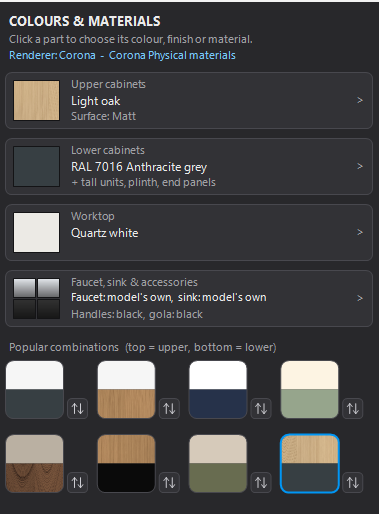
- Upper and lower cabinets in two colours. Twelve popular combinations, with one click to swap top and bottom.
- All 206 RAL Classic colours, plus woods and stones, in matt, satin or gloss.
- Your own material library. Point the plugin at your .mat file: its woods appear for the fronts, its stones for the worktop.
- Pick from the scene. Click any surface in your project and the kitchen takes that exact material.
- Change colours later. Open a finished kitchen, choose new colours and apply. The layout stays.
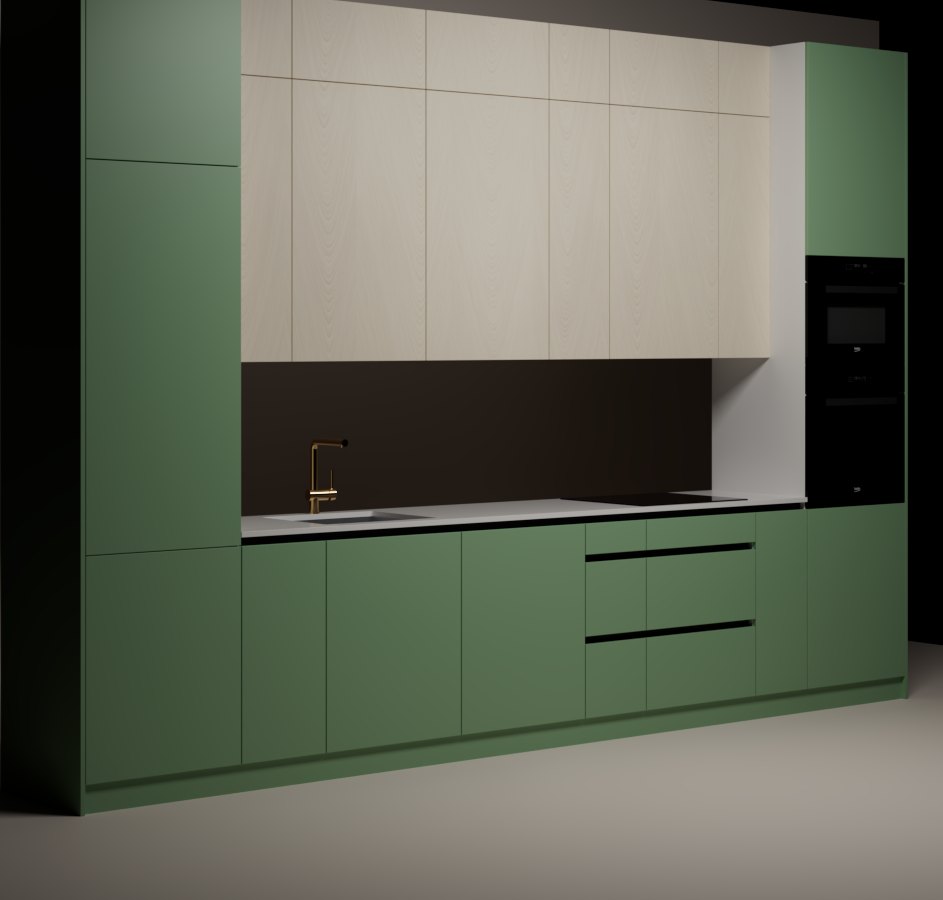
One box, one click, rendered in Corona.
- Lower
- Green, handleless with gola profiles
- Upper
- Light oak, flat fronts
- Columns
- Fridge left, oven and microwave right
- Worktop
- White, 900 mm high
One payment. No subscription.
Single license
For one designer on one computer.
- Kitchen Builder for 3ds Max 2017 to 2027
- Updates for 12 months
- Material library and front styles
- Email support
Studio license
For a studio, on up to three computers.
- Everything in the single license
- 3 activations, move them between computers
- Updates for 12 months
- Priority email support
Secure checkout by Paddle. Prices in US dollars; VAT or sales tax is added at checkout where it applies. Your license key arrives by email right after payment.
Before you buy
Which versions of 3ds Max does it work with?
3ds Max 2017 to 2027 on Windows. Kitchen Builder is a script plugin: no installer, no extra software.
Which renderers are supported?
Corona and V-Ray get their own native materials, built automatically from the renderer set in Render Setup. With any other renderer the plugin uses 3ds Max Physical materials.
Can I use my own materials and appliance models?
Yes. Link your own .mat material library, pick any material from the scene, and add your oven, cooktop, sink, faucet, hood and fridge models to the plugin's library. They are placed automatically on every build.
How does the license work?
After payment you receive a license key by email. Enter it once in the plugin to activate it on your computer. You can move a license to a new computer by deactivating it on the old one.
What if it does not suit my work?
Write to us within 14 days of purchase and we will refund you in full. See the refund policy.
Can I change a kitchen after it is built?
Yes. Select it, change the layout, sizes, front style or colours, and press Rebuild. Each kitchen keeps its own settings, so you can return to any of them later.